

If you go into a modern lab today you’ll see that things are different. No more tiny buttons, confusing menus, or handwritten viscosity notes stuck to clipboards. Touchscreen viscometers have quietly changed the way viscosity testing is done. And it’s not just because they look more high-tech.
Compare viscometer controls and displays
See HSCo's density and viscosity meters. Ask for a quotation and confirm the display and controls on the model offered. See touchscreen viscometers
A well-designed touchscreen interface makes lab work more accurate, saves time, and makes it less stressful every day. Let’s talk about how advanced UI really helps in simple, useful terms.
What Makes Touchscreen Viscometers Different?
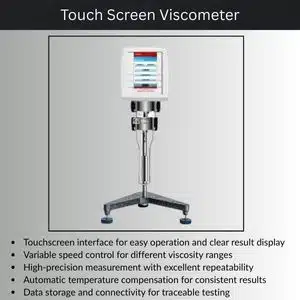
Touchscreen viscometers measure viscosity in the same way that traditional viscometers do. The main difference is how people use the tool.
Instead of pressing a lot of keys or figuring out what abbreviations mean, operators can:
- Choose test methods by tapping
- Readings that are easy to see and happen in real time
- Follow the on-screen instructions one step at a time
This change may not seem like much, but it has a big effect on how well things work and how quickly they get done
How Advanced UI Makes Measurements More Accurate
1. Fewer User Errors
Memory or experience are often used by manual viscometers. If you miss one setting, the whole reading could be wrong.
Touchscreen viscometers lower this risk by:
- Showing only the options that matter
- Locking the wrong combinations of spindle and speed
- Showing warnings when things aren’t right
This built-in help keeps both new and experienced users from making mistakes that affect accuracy.
2. Clear, Real-Time Data Visibility
It can be easy to misread numbers on small displays. Touchscreens fix this by giving you:
- Values that are big and easy to read
- Graphs that show how viscosity changes over time
- Live data on torque and temperature
It’s easier to believe the results when you can see what’s going on during a test.
3. Consistent Test Methods
Touchscreen interfaces often have test programs that are already set up. That means:
- Same parameters every time
- Less difference between operators
- Better repeatability between batches
In quality control labs, where even small differences matter, consistency is very important.
How Touchscreen UI Makes Daily Lab Work More Efficient

1. Faster Setup and Testing
Traditional setup can be slow—adjusting speed, selecting spindle, double-checking values.
With a touchscreen:
- Test methods load right away
- There is guidance for choosing a spindle
- Temperature prompts show up on their own
This can save a lot of time when setting up especially in labs that run a lot of samples every day.
2. Minimal Training Required
One of the best things about these systems is how easy they are to use. New employees don’t need to be trained for weeks.
Most touchscreen viscometers use:
- Easy to understand language
- Icons instead of codes
- Step-by-step instructions
Because of this, they are perfect for labs with staff that changes often or has different skill levels.
3. Built-In Data Storage and Export
You don’t have to write down numbers anymore. Modern touchscreen viscometers can:
- Keep hundreds of test results
- Send data out through USB or software
- Make reports right away
This saves time and cuts down on mistakes when typing up notes, which is something that auditors and managers really like.
Example from Real Life: Quality Control Is Easier Now
Think about a lab that makes food that checks the thickness of sauce every hour. With a keypad model, each technician might do the test in a slightly different way.
A touchscreen viscometer fixes this by:
- Using one saved way to test
- Clearly showing pass/fail limits
- Letting users know if results change
What happened? Less rejected batches and more faith in the quality of the products.
Most Important UI Features
There are differences between touchscreens. These are some useful UI features to look for:
- Method libraries for testing again and again
- Alerts for temperature and torque on the screen
- Graph view for looking at trends
- Support for multiple languages
- Levels of passwords to stop changes that aren’t allowed
These features make the viscometer more than just a measuring tool; it’s like a smart assistant.
Do Touchscreen Viscometers Have Value?
Yes, if your lab values speed, accuracy, and consistency. Touchscreen models may cost more at first but they often save money over time by:
- Cutting down on mistakes
- Reducing the time spent on training
- Making audits easier to prepare for
In a lot of labs, the increase in productivity is enough to make the upgrade worth it.
Conclusion.
Touchscreen viscometers aren’t just about modern looks. Their smart, user-friendly interface plays a real role in improving accuracy while simplifying everyday testing. By guiding operators through each step, reducing common errors, and streamlining data handling, these instruments help labs get reliable results with less effort and less time.
A well-designed touchscreen interface can make viscosity testing feel less like a chore and more like a smooth, reliable process, whether you’re doing quality checks, research experiments, or production tests.
FAQs
1. Do touchscreen viscometers give more accurate results than keypad models?
They don’t change how measurements are made, but they do make it less likely that users will make mistakes, which leads to more accurate and repeatable results.
2. Do you need special training to use touchscreen viscometers?
Most of the time, no. Most of them are made to be easy to use, so you only need basic training to use them every day.
3. Do touchscreen viscometers have the ability to save test data?
Yes. Most models keep results inside and make it easy to export them for reports and audits.
4. Are they safe to use in factories?
Of course. Many have tough screens and sealed interfaces so they can be used in factories and production settings.
5. Is a touchscreen viscometer a good choice for beginners?
Yes. The guided UI makes them very useful for labs. With people of different skill levels or for people who are new to the program.