
The display shows you a number. The app remembers it, bills it and emails it.
That is the whole difference. A weighing scale with mobile app weighs exactly the way the scale on its own weighs — same load cell, same stamped indicator, same accuracy. What changes is what happens to the number after it appears. On a plain scale the reading lives until the next crate lands; after that it exists only if someone wrote it down. On a connected scale it travels by Bluetooth to a phone, where it is stored, numbered, turned into a challan or an invoice and exported to Excel. This guide covers what the app adds, what a record must contain, how two people share one phone — and the one thing the app must never be mistaken for.
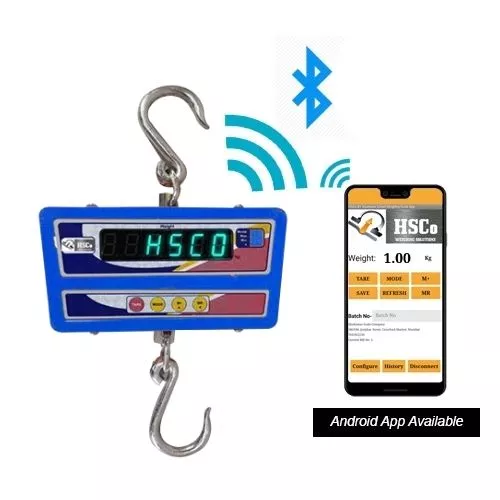
The display forgets. The app remembers.
An indicator is built to show the current weight and nothing else. It has no memory to speak of, no calendar, no idea whose crate is on it. That is not a fault; it is the job. The trouble starts a moment later, when a person copies the number onto a slip, the slip into a register, and the register into a bill.
Each copy is a chance to go wrong. A study of 21,887 data fields published in PLoS One in 2012 measured single-key typing at about 0.4 errors per 1,000 fields for tick-box data and about 6.7 per 1,000 for hand-written numbers — the worst case tested, and exactly the kind of number a weighing slip carries. A 2011 study in Computers in Human Behavior added the uncomfortable part: a second person visually checking the typed figures produced 29–58 % more errors than proper double entry, and a single wrong entry was enough to change the conclusions drawn from the data. In a weighing register, that is a wrong bill.
The fix these studies point to is not more checking. It is fewer copies. When the app takes the reading straight from the scale, the number is copied zero times between platform and invoice.

What can a weighing scale with mobile app do that the display can’t?
Here is the honest list, based on what Hindustan Scale Company (HSCo) has built into its Bluetooth scale apps.
| What you need | The display alone | The scale with its app |
|---|---|---|
| See the live weight | Only if you are standing in front of it | On the phone, a few metres away, in large digits |
| Keep a record of every weighment | No — gone when the next load arrives | One record per weighment, with time, scale identity and a running number |
| Stop a wrong number being typed in | No — the register is whatever the operator writes | The operator cannot hand-type a weight; every stored weight came off the scale |
| Make a delivery challan | No | A serially numbered challan as a PDF, on the spot |
| Make a tax invoice | No | A PDF invoice with your letterhead, logo and GSTIN |
| Get the register into Excel | No — someone re-types it | Exported directly from the phone |
| Change settings safely | Buttons anyone can press | Settings behind a PIN, in an administrator mode |
| Keep the price away from the loading crew | No | An operator mode that weighs and makes challans with no prices visible |
Two of these deserve a closer look, because they are where a phone-based system earns or loses trust: what a record contains, and who may change what.

What a weighing record must carry to be worth keeping
International guidance is surprisingly specific. OIML D 31:2023, the guide for software-controlled measuring instruments, lists what a transmitted weighing dataset should carry: the measured value with its unit, a timestamp, the place, the identity of the instrument, and an unambiguous consecutive number — “enabling assignment to values printed on an invoice”. The European software guide WELMEC 7.2:2022 says the same and adds the buyer’s test: the stored data must be “sufficient for checking invoices”.
Both agree on three behaviours that separate a proper app from a notepad:
- Store only a stable weight. OIML R 76-1 says storing a reading for later use “shall be inhibited when the equilibrium is not stable”. A live bird, a swinging crate and a hand on the platform all produce numbers; none is a weight. HSCo’s apps accept a reading only once it has held steady for a window the customer chooses, from a third of a second to two seconds.
- Store it automatically. The same standard says the legally relevant data “shall be stored automatically” and “must not depend on the decision of the operating person”. The record is written the moment the weight settles — not when the operator remembers to press save.
- Protect it from change. Records must be protected against accidental or deliberate alteration and identified by consecutive numbers or by date and time. In HSCo’s apps nothing is deleted: a wrong entry is cancelled with a reason, stays visible and stops counting towards the totals. Document numbers cannot run backwards.
Those consecutive numbers matter in India for a second reason. A GST tax invoice must carry a consecutive serial number of no more than 16 characters, unique within the financial year, with the date, both GSTINs, the HSN code, the quantity with its unit, the values and the tax (CGST Rules, Rule 46). A delivery challan under Rule 55 carries the same kind of serial and — for anyone who weighs before they price — a provisional quantity where the exact quantity is not yet known; Rule 55(4) then lets the supplier issue the tax invoice after delivery. That is the “weigh now, bill later” pattern most trades already follow on paper, and HSCo’s poultry-trade app follows it in software: challan → evening invoice → payment pending → received, weights fixed at the shed, rate added at the desk.
Two dates to know: since 31/12/2018 an electronically issued invoice needs no signature (Notification 74/2018–Central Tax), and since 01/08/2023 businesses above ₹5 crore aggregate turnover must generate e-invoices with an IRN and QR code (Notification 10/2023–Central Tax). The phone’s PDF is not that e-invoice; it is the numbered, timestamped record your billing software builds it from.
Two people, one phone: the operator and the administrator
The person weighing crates at 6 am should not be the person who can change the rate per kilo. Standards say so in their own words. OIML R 76-1 requires settings and pre-set controls to be secured, and allows software securing “provided that any access to the secured controls or functions becomes automatically evident”. The US FDA’s electronic-records rule, 21 CFR 11.10, asks for access limited to authorised individuals, authority checks before anyone can alter a record, and time-stamped audit trails of who changed what.
On an HSCo app this becomes two modes on one phone. An operator mode opens without a password: it shows the live weight, records weighments, makes challans and shows no prices. A PIN-protected administrator mode holds the bills, rates, reports, exports and settings. The crew sees kilograms; the owner sees rupees. One handset, two jobs, no argument about who changed the rate.

What the app is not
It is not the legal reading. This is the point buyers most often get wrong. OIML R 76-1 calls a device that “repeats or further processes the weighing result” a peripheral device — the same category as a printer or a second display. OIML D 31:2023 gives the mobile-app case as a worked example: the result “is indicated on a display attached to the instrument” and “also sent back to the mobile device”, and adds that software on “a universal device such as a smartphone” may not be possible to fully secure. In plain terms: the verified indicator on the scale is the legal figure; the phone repeats it. In a dispute, the stamped instrument’s number is the one that counts (see what government stamping is).
It does not replace verification. Under the Legal Metrology Act 2009, every weighing instrument used in trade must be verified and stamped before use (section 24) and re-verified periodically — every 12 months for platform, crane and weighbridge-type instruments, every one or two years for counter-type scales depending on the type, and after any repair or re-installation (Legal Metrology (General) Rules 2011, Rule 27). Using an unverified instrument carries a fine of ₹2,000–₹10,000, and up to a year’s imprisonment for a repeat (section 33). No app changes that.
It is not an ERP. It produces the record an ERP wants — numbered, timestamped, exportable — and HSCo offers ERP and billing integration where the two must be joined.
It is not tied to an expensive phone. About nine in ten phones in India run Android — 92.8 % of mobile usage in August 2026 by StatCounter’s count, with Apple at 7–12 % of quarterly shipments through 2025 according to Counterpoint Research. An Android app runs on the handset your supervisor already carries, and HSCo’s apps work fully offline.
What changes on Monday morning
- The weight is written down once — by the scale. Nobody re-types it, so the hand-written error rate stops applying to your register.
- Every challan has a number, a time and a scale behind it. When a customer says “that was 40 kg, not 42”, you open the record, not the argument.
- The evening bill is built from the morning’s weights. Rate added at the desk, invoice as a PDF with your letterhead, register into Excel for the accountant.
- The crew cannot see prices or change settings. Two modes, one phone, one PIN.
- Your stamped scale is still the legal instrument. The app added memory and paperwork; it replaced nothing.
How to start: one scale, one phone, thirty days
- Pick the scale whose slips get re-typed most. A scale you already own can take a Bluetooth module; or start with a Bluetooth platform scale such as the waterproof PLSSWBT or a CRHBT crane scale.
- Install the app on the supervisor’s own Android phone. In administrator mode, set the steady-weight window, your letterhead, logo and GSTIN.
- Run the old register and the app side by side for thirty days.
- Count: entries that differ, minutes spent on the evening’s paperwork before and after, disputes raised.
- Roll out to the next scale only if the numbers say so.
Hindustan Scale Company has made weighing scales in Mumbai since 1955 and builds the scales, the Bluetooth hardware and the apps itself — one supplier for the whole chain. The connected options are on the IoT connected weighing scales page.
Frequently asked questions
Is the weight shown in the app legally valid?
No. In legal-metrology terms the phone is a peripheral device that repeats the weighing result; the verified, stamped indicator on the scale remains the legal figure. The app’s job is to remember that figure, number it and turn it into paperwork — not to replace it.
Can the operator type or delete a weight in the app?
No. Every stored weight came off the scale over Bluetooth; there is no field to type one in. A wrong entry is cancelled with a reason, stays visible in the register and stops counting towards totals, so the record of what happened is never lost.
Does the app work without internet?
Yes. The scale and the phone talk over Bluetooth, and the records, challans and invoices are made and stored on the phone. You export or share them whenever you have a connection.
Can I make GST challans and invoices from the app?
Yes. Challans and tax invoices are produced as PDFs with your company name, address, logo and GSTIN, and a consecutive document number in one unbroken series — the serial numbering Rule 46 and Rule 55 of the CGST Rules require. Check your invoice format against Rule 46 with your accountant before you bill on it; if your turnover puts you under e-invoicing, the IRN and QR code come from your billing software.
Which phones does it run on?
The HSCo scale apps described here run on Android, which about nine in ten phones in India already use, so the supervisor’s existing handset is usually enough. The app can be used in operator mode by the crew and in PIN-protected administrator mode by the owner on the same phone.
Can I add an app to a scale I already own?
Usually, yes. A scale with a data output can be fitted with a Bluetooth module that sends its readings to the phone. The scale itself still needs its Legal Metrology verification; the module and the app do not change that.
Next step
Compare every HSCo Bluetooth weighing scale side by side, with capacity, reading steps and price: Bluetooth weighing scales.
Tell us which scale’s slips get re-typed most, and we will propose a thirty-day pilot of the app on it — your phone, your letterhead, your challan numbers.
Hindustan Scale Company (HSCo) · Mumbai · est. 1955 · www.hindustanscale.com · hsc@hindustanscale.com
Sources
- OIML R 76-1:2006 — Non-automatic weighing instruments, Part 1: Metrological and technical requirements — Tests: T.2.3.5 peripheral device; T.2.2.6 secondary display; 4.1.2.4 securing of components and pre-set controls; 4.4.6 storage only when stable; 5.3.6 interfaces; 5.5.3 data storage devices.
- OIML D 31:2023 — General requirements for software-controlled measuring instruments: mobile-app example (result on the instrument’s own display, also sent to the smartphone); smartphone as a “universal device”; 6.3.5.2 completeness and 6.3.5.3 protection of transmitted data.
- WELMEC Guide 7.2:2022 — Software Guide (Measuring Instruments Directive 2014/32/EU): Type U instruments on a universal device; Extension L, long-term storage requirements L1–L8.
- The Legal Metrology Act, 2009 (India) — section 24, verification and stamping; section 33, penalty for use of an unverified weight or measure.
- The Legal Metrology (General) Rules, 2011 — Rule 27, periodical verification (24 / 60 / 12-month classes; re-verification after repair or re-installation).
- S.S. Rana & Co. — Verification of Weights & Measures under the Legal Metrology Act (2024): independent legal summary of Rule 27 periods and section 33 penalties.
- CGST Rules, 2017 — Rule 46, tax invoice; Rule 55, transportation of goods without issue of invoice (delivery challan). Texts reproduced by GSTZen, ClearTax and TaxGuru.
- Notification No. 74/2018–Central Tax, G.S.R. 1251(E), 31/12/2018 — proviso to Rule 46 (no signature on an electronic invoice); Notification No. 10/2023–Central Tax, 10/05/2023 — e-invoicing above ₹5 crore from 01/08/2023; EY India tax alert (May 2023).
- US FDA — 21 CFR § 11.10, Controls for closed systems: limiting system access, authority checks, time-stamped audit trails.
- Paulsen A., Overgaard S., Lauritsen J. M. — “Quality of Data Entry Using Single Entry, Double Entry and Automated Forms Processing”, PLoS One 7(4): e35087 (2012); Barchard K. A., Pace L. A. — “Preventing human error: The impact of data entry methods on data accuracy and statistical results”, Computers in Human Behavior 27(5) (2011).
- StatCounter Global Stats — Mobile Operating System Market Share India (August 2026); Counterpoint Research — India Smartphone Market Share: Quarterly (Q1 2025 – Q2 2026).
- Hindustan Scale Company — IoT Connected Weighing Scales page; HSCo Bluetooth scale apps (poultry-trade app and metal-industry app), September 2026.