
Changing the accuracy setting on the MSM BCI
What this video shows
The MSM BCI demonstration shows how to reach and change the scale’s accuracy setting. The captions make the opening action reasonably clear: hold MODE while switching on the scale. They then refer to MODE, the plus key and ENTER as the setting is changed. The spoken numerical value is unclear, so use the setting specified for your unit rather than a number taken from the captions.
Check each display prompt against the video as you work. The final part shows the scale being switched off after the change.
Steps in the video
- Switch off the MSM BCI scale.
- Hold MODE while switching the scale on.
- Use MODE to reach the accuracy setting shown on the display.
- Use the plus key to change the displayed setting.
- Press ENTER to confirm the displayed setting.
- Switch the scale off after completing the change.
The scale in this video
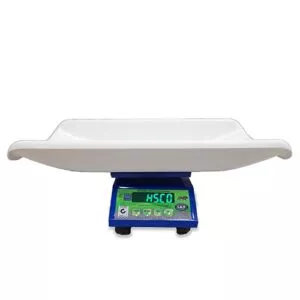
The model in this guide is the MSM BCI Electronic Baby Cum Infant Scale. Check its specification before changing the accuracy setting.
More videos like this


Questions about this scale? WhatsApp or call +91-7045922250 (sales) or +91-7045922206 (service), or write to hsc@hindustanscale.com. All videos: Help & Videos.